Shader Program
Shader Program has one and only role.
- Render data from VertexArray to framebuffer using provided shaders.
It sounds simple on paper, but this task is the most important and also huge.
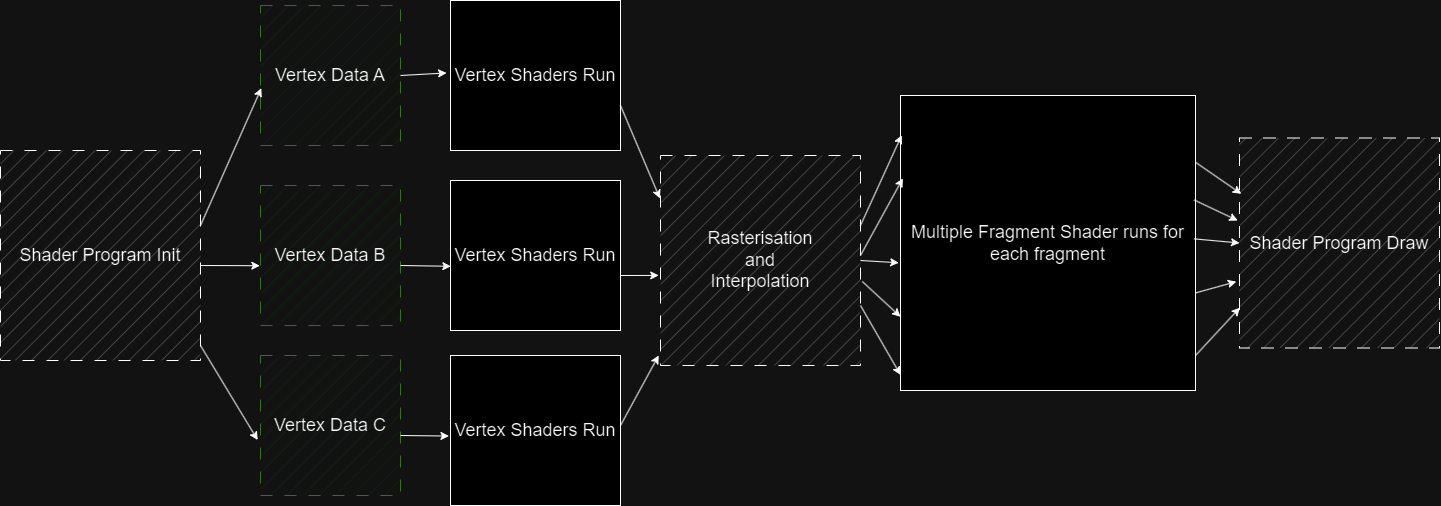
It must be defore splitted into multiple parts as illustrated in this image:

Each part has it's own complex systems and some parts are separated to their own classes.
Parts I'm talking about are Shader Linking and Texture Handling.
I used to have them connected in single class, but it made my methods too huge and unreadable,
and it broke the base programing principles.
For the purpose of explanation, I'm going to be talking as if these things were all one,
but just keep in mind, that in code, some parts of shader program are separate.
Lets now talk about each of those parts:
Shader Linking
The whole renderer works with user defined shaders.
In this case, the shaders can be anything and program should still work with it fine.
Shaders can have their own inputs and outputs.
The program therefore needs to know what it sets and from where it reads.
To obtain this knowledge, shader linking is required.
Linking is done by System.Reflection.
Shaders being declared as classes, means that I can read the field information of variables,
and get their attributes, from which I can declare variable to be Input, Output and Uniform.
I can then save this information and use it when going through rendering pipeline.
- I keep Vertex Inputs in List, so that I can assing values in correct order for each vertex.
- Then I keep Vertex Outputs and Fragment Inputs connected inside a dictionary.
So that I know what output goes where based on attribute name.
- I also check that fragment output is one and only one.
- At last I keep Uniforms inside the dictionary, so that I can access them by their attribute name.
Linking happens at the initialization of ShaderProgram.
Texture Handling
Texture handling is used as you might have concluded by yourselves... to handle textures. You can create your own textures using TextureBuffers...
More on texturebuffers in 'Buffers' guide
...and bind them to your shader program.
Then use the returned sampler id to sample the texture in your shaders.
You can override binded texture by providing id, but keep in mind,
that if there isn't a texture with given id, you will get id assigned by the program.
In shaders you can use ShaderFunctions object to get data from texture.
Note: You can't write to textures, if you want to render to a texture,
you can only render to a custom framebuffer and make texture out of it.
Rendering pipeline
The entire rendering task goes through process called the Rendering Pipeline. The pipeline goes like this:
-
Prepare data for VerexShader from VertexArray
-
Run VertexShader for each vertex.
-
Split Resulted Vertices into triangles
-
For each triangle Rasterise into fragments
-
For each fragment interpolate vertex outputs.
-
Run FragmentShader for each fragment.
-
Depthfilterring
-
Draw the pixel to the framebuffer.
1. Prepare data for VerexShader from VertexArray
With the help of user defined Stride, Data from VertexBuffer and Linker fetched vertex inputs, the ShaderProgram creates as many vertex shaders as there are vertices availible, and assigns those values to them.
3. Split Resulted Vertices into triangles
After VertexShader run is over, the ShaderProgram splits vertices into triangles using the user-defined Element Buffer obtained from Vertex Array.
4. Rasterise triangles
There are 2 well known ways CPU rasteriser can rasterise triangles.
It can pick vertex and based on vectors of vertices calculate the position of next fragment.
This method is interesting on it's own and definitely a good choice for serial codes.
Unfortunately, it is hard to implement for parallel processing. Therefore it isn't used that much
in GPU programming. Even though I have CPU Rasteriser, I also wanted to have parallel processing.
So that's why I've chosen to do it other way. Note: It definitely wasn't because other way is easier :).
So, what is the other way? Very simple, you itterate through bounding box of the triangle,
determine if fragment lies in the triangle, if yes you run fragment logic and if not you continue to next pixel.
That's it. Sounds like a lot of wasted logic, but for GPU's, it is the best thing ever, since you are not bound
to any previous fragment. You can run all fragments at once. For me it ment's one big Parallel.For loop, which is also
the most desirable outcome.
Ok, so the next obvious question one could ask, is how to decide whether fragment is inside of a triangle.
It all goes back to linear algebra and determinants. Let's say we have one 2D vector, that is fixed other one that we move.
If I create a matrix where first vector is the first column and second vector is the second column, and calculate it's determinant,
I'll get the area of parallelogram of these two vectors.
The point of the joke lies in the sign of this area.
- If the are is positive, the second vector lies to the right of the first vector.
- If it's negative, vice versa.
Ok, but now you might be asking how it can help us determine whether the point lies inside a triangle.
When we take vectors of lines of the triangle, (direction should be clockwise or anticlockwise for all lines)
and put them to matrix with the vectors we get from the point and the vertices,
and calculate determinants for all 3 matrices, when every single determinant is positive,(negative for anticlockwise)
it must lie inside a trinagle.
It takes a bit of work, but gpu's have entire rasterization hardcoded so they can do it very efficiently.
As for me, well, I had so sacrifice some preformance, but I have much larger performance eaters, so it doesn't really matter that much.
What matters is I can now use parallelism for this process.
5. Interpolate vertex outputs
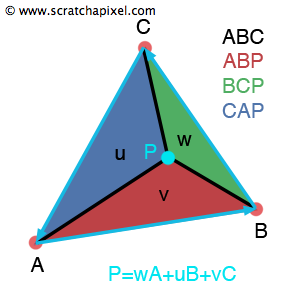
Interpolating vertex outputs is once again done by calculating determinants.
Spoiler alert, I use the same ones. Another important value I need is area of the entire triangle.
As you've guessed it, I can do it using determinants. All I need is reverse one of the line vectors,
and calculate it the same way I did for the point.
Afterwards, I just divide each of the point determinants with the triangle determinant.
What I'll get is percentage value of areas splitted by the point.
Now, for each vertex the contribution is the percentage of the oposite area.
This method is called 'using barycentric coordinates' and it is used in almost every triangle interpolation,
since it provides the best result and is super fast.
 https://www.scratchapixel.com/lessons/3d-basic-rendering/ray-tracing-rendering-a-triangle/barycentric-coordinates.html
7. Depthfilterring
Depthfilterring is a process that discards fragments that have depth lesser than already drawn fragment. It is done (most of the time) by having a buffer that has the same size as the framebuffer and after drawing each pixel, you write also the z-coordinate to the depth buffer. It can afterwards be used for other fragments to check their z-coordinates. If their are smaller than buffered ones, the fragment is discarded.
Sumarry
The ShaderProgram is the most important part of the CPU renderer. It's whole purpose is to draw 3D image to framebuffer using user-defined shaders. It's task can be split to shader-linking, rendering and texture managment. The renderer runs the Render-pipeline, which prepare data for shaders, runs shaders, rasterises triangles and interpolates data and lastly outputs pixel to a framebuffer.